For the nights the line gets long.
Give guests a way to order from where they are and stay with their group while they wait. Your team manages each station’s queue, controls new orders and handles pickup.

Would it fit your bar?
What running it would involve.
Start with one station and an agreed menu. Before a pilot, we work through the practical setup with the people who will use it.
Alongside your existing POS.
The current product keeps its own menu, orders and reports. POS integrations are scoped on request; tell us your system and we confirm compatibility, scope and timing before agreeing the work.
A phone or tablet.
Use a compatible device your venue already owns. We review the screen, placement and staff access during setup.
Reliable internet.
Guest ordering and the staff queue need a connection. We check coverage at the pickup station and agree what staff do if it drops.
A named staff lead.
Choose who watches the queue, prepares orders and handles pickup. Plan that work alongside your counter service.
A clear pickup spot.
Guests choose a station before ordering. Give them a visible place to meet staff, show the pickup cue and complete ID checks.
A closeout process.
Agree who updates the menu and checks sales, tips and refunds. Use Barstride’s exports alongside your POS reports, and tell us where a connection would help.
Every phone order. One queue.
Orders land in Up next at the station the guest picked, with the drinks and pickup code. A bartender chooses Start preparing, then marks the order Ready for collection.
- Follow the order. Up next, Preparing and Ready, then staff mark it Collected.
- Set the load. Limit active phone orders and drinks still to be made at each station.
- Run it when you need it. Staff can open, pause, resume or close phone ordering at their station. Accepted work stays with the team.
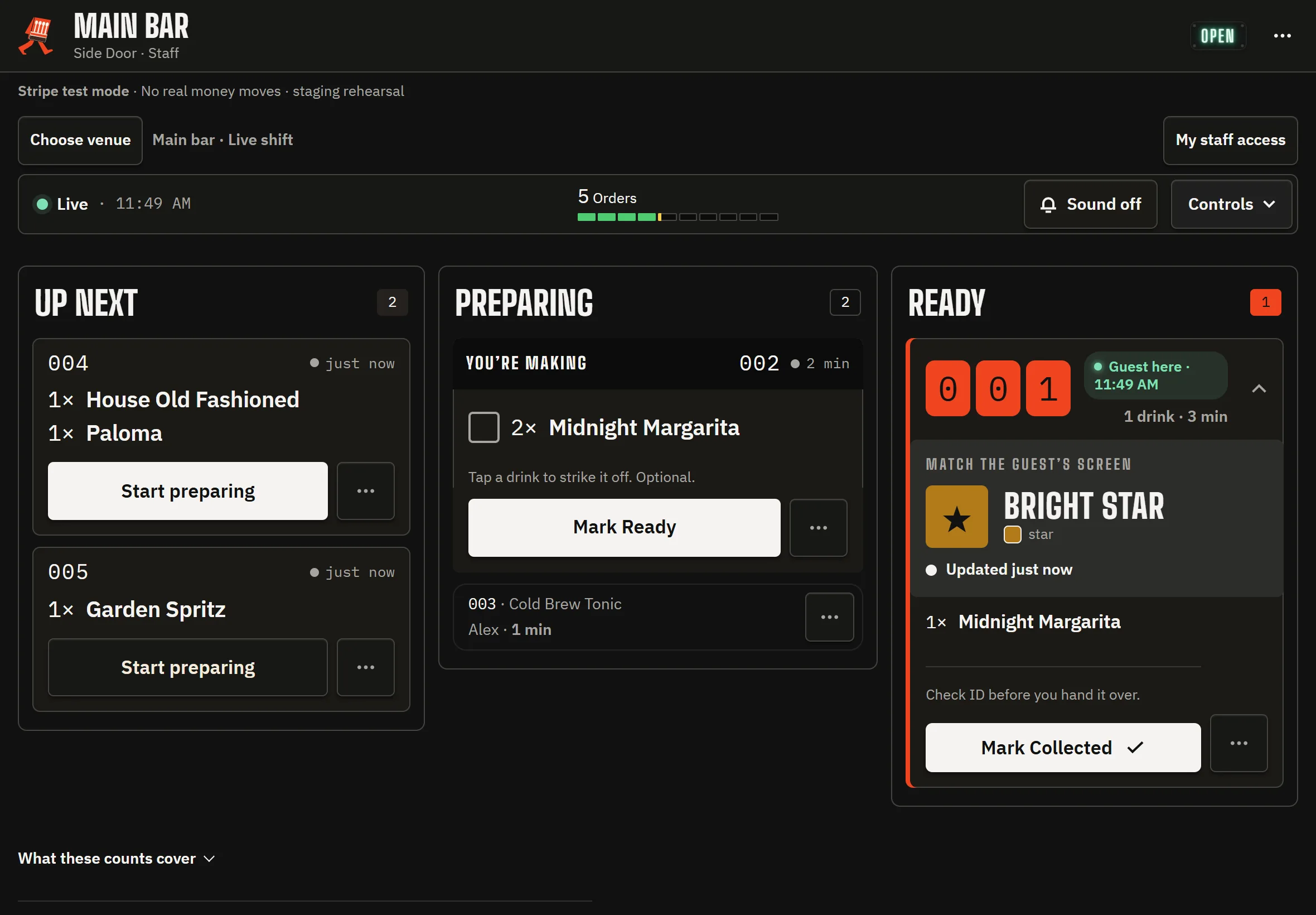
On a tablet behind the bar
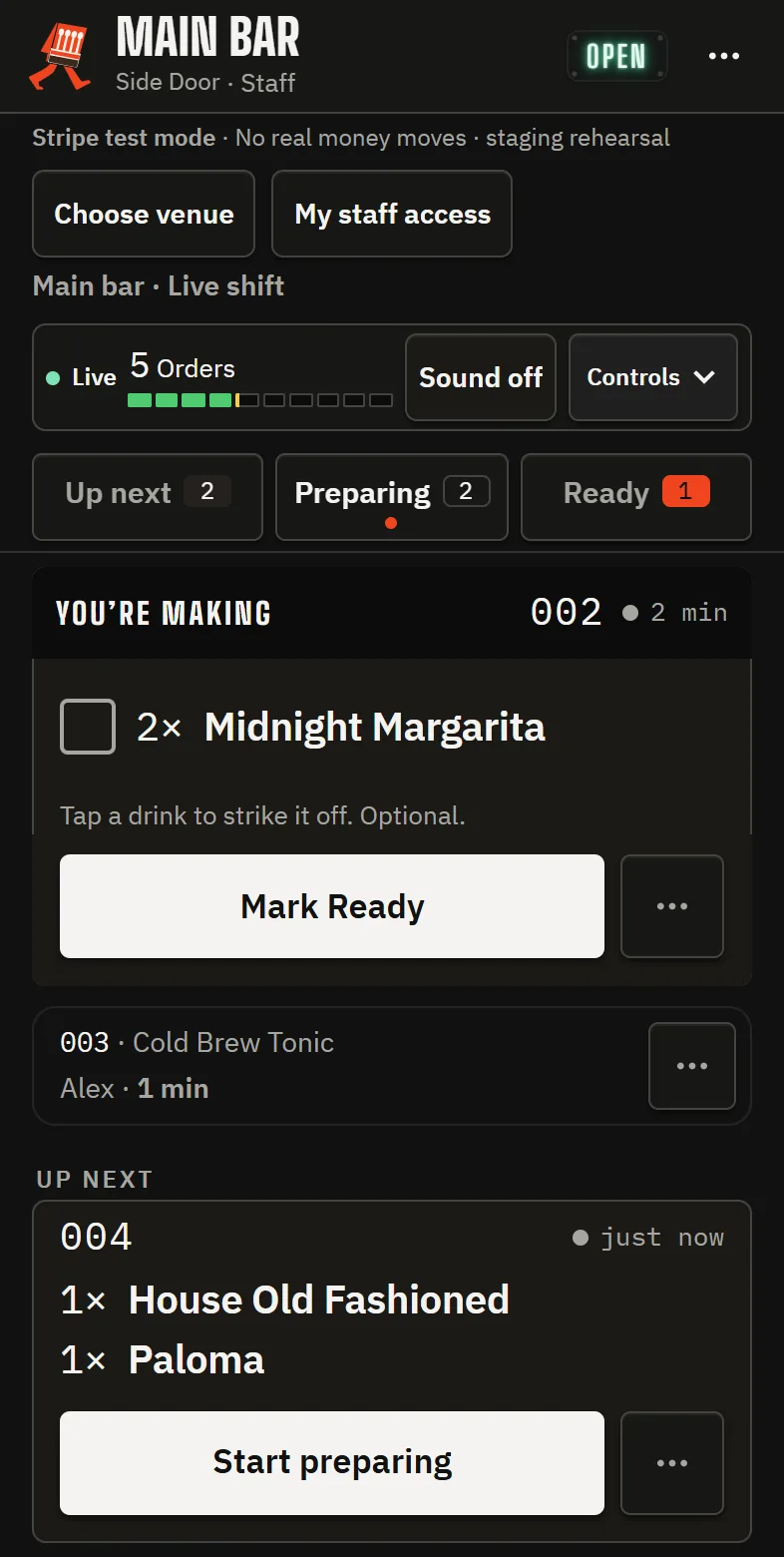
On a bartender’s phone
Inside the owner’s workspace.
Explore the tools for setting up your menu, running service and reviewing the night.
Make the menu your own.
Manage the drinks guests can order at each station.
- Edit names, descriptions, prices and categories.
- Keep POS item codes with your menu for closeout.
- Import a CSV or paste from a spreadsheet, then review it before publishing.

Sold out? Update it here.
Keep the guest menu in step with what the bar can serve tonight.
- Mark a drink unavailable for new orders.
- Make it available again when it is back.
- Keep accepted orders visible for staff to finish or resolve.

Set the load your team can handle.
Each pickup station has its own limits for active orders and drinks still to be prepared.
- Set a maximum number of active orders.
- Set a separate preparation-drink limit.
- Ready drinks free preparation capacity while the order remains active until collection.

See when phone orders come in.
Review service counts and phone orders by hour, with the busiest hour marked.
- Compare accepted and collected orders.
- Read hourly order counts on your venue’s local clock.
- Use Barstride’s records alongside your POS closeout.

Take the records into closeout.
Choose a business-date range and download the Barstride records your team needs.
- Drinks sold, order lines and night totals.
- Separate files for payouts and unpaid tabs.
- CSV files with POS item codes to help you reconcile phone orders.

Also in owner setup: staff access by station, tab limits, payment follow-up, guest-page appearance and CSV downloads for sales, payouts and unpaid tabs.
$0
monthly Barstride fee in pilot
Proposed pilot terms
A pilot shaped with your team.
No monthly Barstride fee during the agreed pilot. Payment-processing charges apply. We confirm the complete fee schedule, including any dispute charges and ongoing monthly costs, before you join. Paid continuation needs an agreed billing start date.
Check the fit.
Talk through your POS and service pattern. Scope any integration you need, and agree how orders and reports would fit your existing process.
Set up one station.
Agree the menu, pickup spot, devices, staff access and limits. Confirm the fees and responsibilities before the trial.
Rehearse with staff.
Practice taking an order, pausing service, matching a pickup and handling a drink that cannot be served.
Run an agreed trial.
Choose the shifts, staff cover and support contact together. Agree when to pause or stop if service is affected.
Review the whole shift.
Compare service, staff workload, tips, costs and closeout time. Decide together whether to continue.
Asking about the pilot starts a conversation about fit and setup. It does not commit your venue or open ordering.
Straight answers.
What would we learn from a pilot?
Whether phone ordering and pickup make the busy part of the night easier for guests and workable for your team. We review the guest experience, staff workload, collection, costs and closeout before deciding whether to continue.
Do phone orders jump the line?
Your bartenders decide. Phone orders wait in Up next on the station screen, and nothing starts until someone taps Start preparing. Walk-up service carries on as it does now.
What will it cost?
No monthly Barstride fee during the agreed pilot. Payment-processing charges apply. We confirm the complete fee schedule, including any dispute charges and ongoing monthly costs, before you join. Paid continuation needs an agreed billing start date.
What do we need to run it?
A compatible phone or tablet behind the bar, reliable internet and a staffed pickup spot. Guests order in the browser. We review devices and setup with each pilot venue. Expecting a busy day or night? Consider scheduling one additional bartender dedicated to mobile orders, so your team can keep both pickup and counter service moving.
What happens after I ask?
We will follow up to discuss whether a pilot fits your venue and what setup would involve. Sending an inquiry does not commit your bar or guarantee a place.
Does it connect to our POS?
POS integrations scoped on request. Tell us your system; we confirm compatibility, scope and timing before agreeing an integration. The current product runs separately, with its own menu, orders and reports. We agree how your team would reconcile them before a pilot.
What happens when we pause?
Staff can pause, resume or close phone ordering at their assigned station. Accepted orders remain for the team to finish. You choose when to run phone ordering alongside counter service.
Who handles ID checks and refusal?
Your venue’s staff handle ID checks, service decisions and physical handover. Paying or opening a tab does not override those checks. We would agree the pickup, refusal and refund process with your team before a pilot.
Bring Barstride to your bar.
Tell us about your bar or club. We will talk through fit, staff controls and what a trial would ask of your team.
Tell us about your venue. We will follow up to discuss fit and how a pilot could work; an inquiry does not reserve a place.